Every call summarized.
Stenografista records both sides of any call and delivers a summary with action items — all on your Mac, nothing ever leaves your computer.
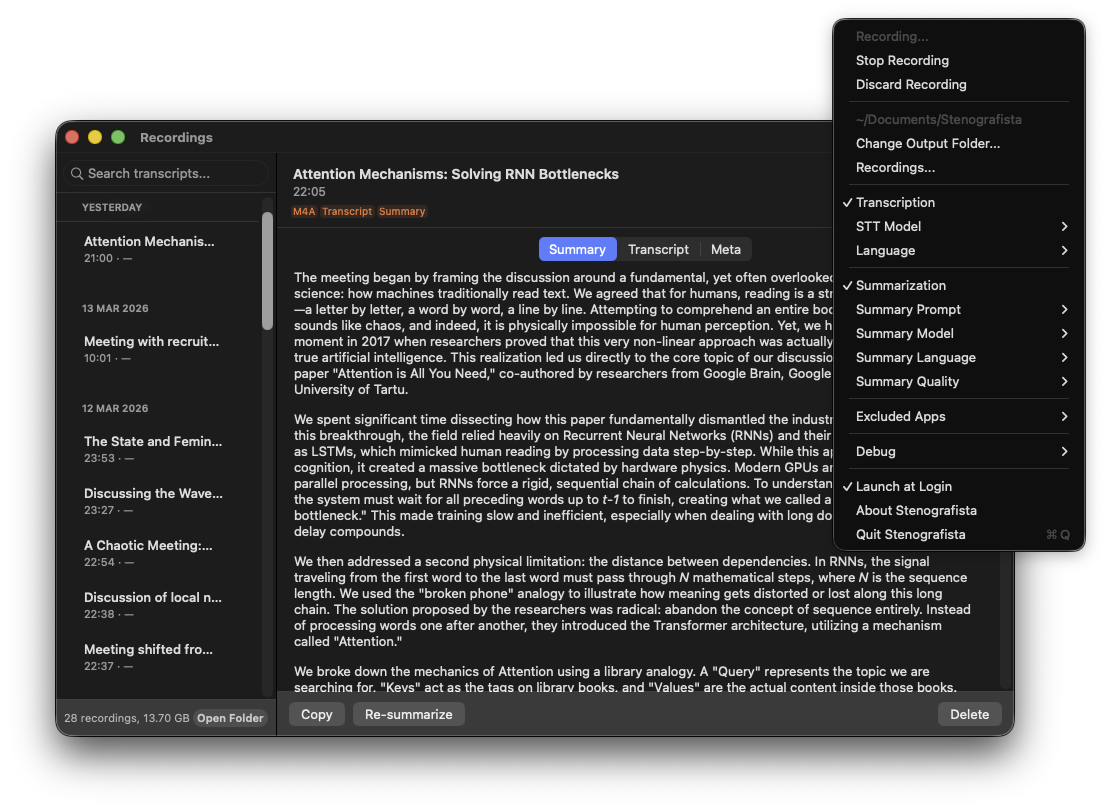
You talk. Stenografista does the rest.
Call starts
Your microphone turns on — Stenografista detects it and starts capturing both sides of the conversation.
Call ends
The microphone goes silent. Stenografista waits a few seconds in case you're just on mute, then starts processing.
Summary is ready
Speech-to-text converts the audio to a transcript, then a local AI model distills it into a structured summary with key points and action items. All files are saved to your Mac.
Everything runs on your Mac. Nothing leaves it.
No servers. No accounts. No analytics inside the app. After a one-time model download (~1.2 GB on first launch), Stenografista never needs the internet again. Everything is processed on your hardware. Your recordings never touch a network interface — verify it yourself with Little Snitch or any firewall.
Built for people who can't afford to forget.
AI-powered summaries
Key points, decisions, and action items — extracted automatically right after the call ends.
Full transcripts
On-device speech-to-text produces a searchable transcript of every call, saved alongside the summary.
Choose your model
Pick the AI model that fits your hardware — from a lightweight 2B model for 8 GB Macs to larger ones for more detailed summaries. All run locally on your Mac.
Any audio device
Built-in mic, USB microphone, Bluetooth headset — including hot-plugging devices mid-call.
Crash-safe recording
Audio streams to disk continuously. If your Mac crashes mid-call, the recording up to that point is preserved.
Multi-language
Transcription and summaries support dozens of languages. Speak in one language, get your summary in another — or keep everything in the original.
Works with your AI agent
Connect Claude Code, Codex, or Cursor and ask about your own calls: “what did we discuss this week?”, “redo the last transcripts with a better model”, or let a more powerful model rewrite a summary. Off by default — nothing is shared until you connect an agent, and what you share goes only to that agent (and its model provider, if it runs in the cloud).
Ready in two minutes
Install the app, grant two permissions, and you're done.
Install
Open the DMG, drag Stenografista to your Applications folder, then launch it. You'll see a new icon in your menu bar.
Launch
Open Stenografista from the Applications folder. A small icon appears in your menu bar — this is where you'll control the app. On first launch, macOS will ask for the permissions below.
Grant Microphone access
macOS will prompt you automatically on first launch. Click Allow — this lets Stenografista detect when calls start and record your microphone.
Grant Audio Capture
A second prompt will appear right after. Click Allow — this lets Stenografista hear the other person's voice.
Pick a summary model (optional)
Click the menu bar icon and choose your preferred AI model. The default runs comfortably on any Apple Silicon Mac with 8 GB RAM. Larger models produce more detailed summaries if you have the RAM.
Requirements
- macOS 14.2 (Sonoma) or later
- Apple Silicon Mac (M1, M2, M3, M4)
- 8 GB RAM minimum — 16 GB+ recommended for larger AI models
Frequently asked questions
Does Stenografista upload my audio anywhere?
Which apps does it work with?
Does it really work offline?
Do I need to create an account?
Is it legal to record calls?
What Mac do I need?
Never write meeting notes again.
No account required. Just install and forget.